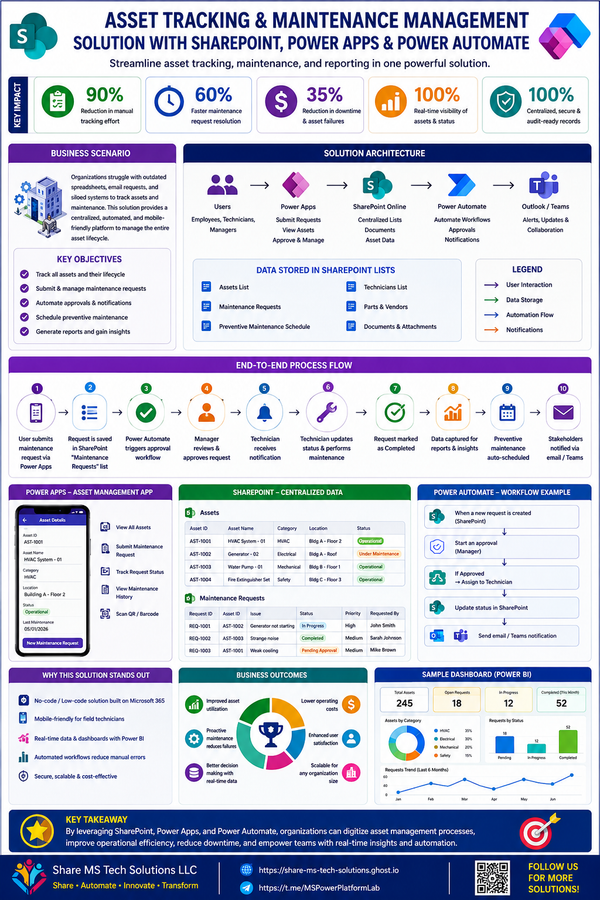
✈️ Automating Travel Request Approvals with Microsoft Power Automate
Building a Scalable, Enterprise-Ready Workflow Architecture with SharePoint, Outlook, and Microsoft Teams
Modern organizations move fast. Employees travel for:
- client meetings
- conferences
- training
- operational support
- project deployments
- executive collaboration
Yet surprisingly, many companies still manage travel approvals using:
- long email threads
- disconnected spreadsheets
- manual status tracking
- paper forms
- inconsistent approval processes
The result?
❌ Delayed approvals
❌ Lost requests
❌ Poor visibility
❌ Compliance risks
❌ Frustrated employees
❌ No centralized audit trail
As organizations continue investing in digital transformation and operational efficiency, travel approval workflows are becoming a perfect use case for intelligent automation.
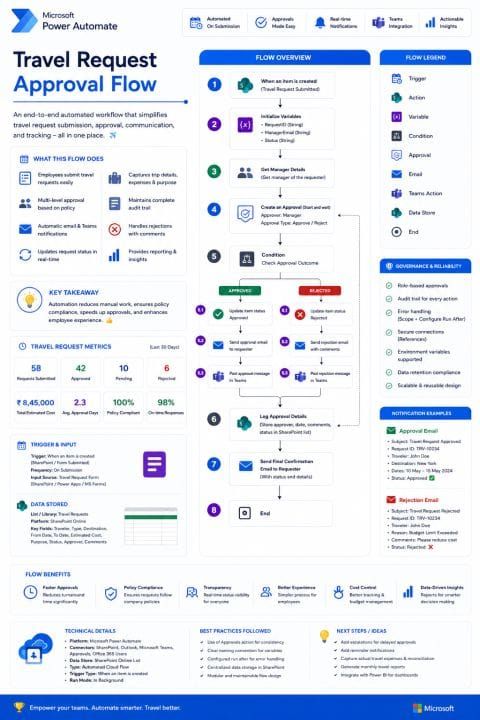
To solve this challenge, I designed an end-to-end Travel Request Approval Flow using:
- Microsoft Power Automate
- SharePoint Online
- Outlook
- Microsoft Teams
- Power Platform governance practices
The goal was not simply to automate approvals.
The goal was to build a:
✅ scalable
✅ maintainable
✅ enterprise-ready
✅ audit-friendly
✅ user-friendly workflow architecture
that modern organizations can rely on.
Why Traditional Travel Approval Processes Fail
In many environments, travel requests typically look something like this:
Employee submits request ↓Manager forgets email ↓Finance asks for updates ↓HR requests missing information ↓Travel dates change ↓Nobody knows current statusThis creates operational bottlenecks that grow worse as organizations scale.
Common issues include:
- inconsistent approval routing
- missing approvals
- duplicated communication
- lack of reporting
- manual follow-ups
- poor compliance visibility
These are exactly the types of problems workflow automation is designed to solve.
The Solution: Automated Travel Request Approval Workflow
The solution architecture focuses on simplifying and centralizing the entire approval lifecycle.
The workflow automatically:
✅ Captures travel requests
✅ Routes approvals dynamically
✅ Supports approval/rejection comments
✅ Sends real-time notifications
✅ Updates statuses automatically
✅ Logs all approval activity
✅ Maintains audit history
✅ Generates operational insights
This dramatically improves:
- speed
- visibility
- consistency
- accountability
- employee experience
High-Level Workflow Architecture
The automated workflow follows a structured enterprise approval pattern.
Travel Request Submitted ↓Store Request in SharePoint ↓Get Manager Information ↓Create Approval Request ↓Manager Approves or Rejects ↓Send Notifications ↓Update Request Status ↓Log Audit History ↓Generate Reporting DataThis architecture provides both operational simplicity and governance readiness.
Core Technologies Used
Microsoft Power Automate
Handles:
- workflow orchestration
- approvals
- automation logic
- notifications
- integrations
SharePoint Online
Acts as:
- centralized data repository
- audit history database
- reporting source
- status tracking system
Microsoft Teams
Provides:
- approval visibility
- collaboration
- real-time notifications
- operational awareness
Outlook
Handles:
- approval emails
- confirmation messages
- rejection notices
- escalation notifications
Workflow Step-by-Step Breakdown
Step 1 — Travel Request Submission
Employees submit requests through:
- SharePoint forms
- Microsoft Forms
- Power Apps custom forms
The request includes:
- destination
- purpose
- dates
- estimated cost
- department
- manager
- justification
Once submitted, the automation begins immediately.
Step 2 — Store Request in SharePoint
Every request is stored centrally in SharePoint.
This provides:
✅ centralized tracking
✅ reporting visibility
✅ audit readiness
✅ version history
✅ secure access management
Example columns include:
| Column | Purpose |
|---|---|
| Request ID | Unique identifier |
| Employee Name | Requestor |
| Destination | Travel location |
| Travel Dates | Start/end dates |
| Estimated Cost | Budget tracking |
| Approval Status | Current state |
| Manager Comments | Decision notes |
Step 3 — Dynamic Approval Routing
Instead of hardcoding approvers, the workflow dynamically determines the correct manager.
This creates:
- flexibility
- scalability
- easier maintenance
The flow can retrieve managers from:
- Microsoft Entra ID
- Office 365 Users connector
- SharePoint mappings
- Dataverse tables
Step 4 — Approval Creation
The workflow generates an approval request automatically.
Managers can:
✅ approve
✅ reject
✅ provide comments
Approvals can be handled directly:
- inside Outlook
- inside Microsoft Teams
- within the Power Automate approvals center
This dramatically reduces approval delays.
Step 5 — Real-Time Notifications
The system automatically sends:
- approval confirmations
- rejection notifications
- Teams alerts
- reminders
- escalation messages
This keeps stakeholders informed without manual follow-up.
Step 6 — Status Updates
Once a decision is made:
- SharePoint updates automatically
- dashboards refresh instantly
- reporting remains accurate
Status examples:
- Pending
- Approved
- Rejected
- Escalated
- Cancelled
This eliminates manual spreadsheet tracking entirely.
Step 7 — Audit Logging & Compliance
Every approval action is logged automatically.
This includes:
✅ approver
✅ timestamp
✅ comments
✅ decision history
✅ status changes
This becomes critical for:
- finance compliance
- operational governance
- policy enforcement
- auditing requirements
Enterprise Architecture Considerations
The biggest mistake organizations make with automation is building workflows that only work temporarily.
Enterprise-ready automation must be:
- scalable
- modular
- secure
- maintainable
This workflow was designed with those principles in mind.
Key Architecture Decisions
1. Centralized SharePoint Storage
Instead of storing logic everywhere:
- data remains centralized
- reporting becomes easier
- maintenance improves
2. Modular Workflow Design
The flow separates:
- approvals
- notifications
- logging
- reporting
This improves:
✅ maintainability
✅ troubleshooting
✅ scalability
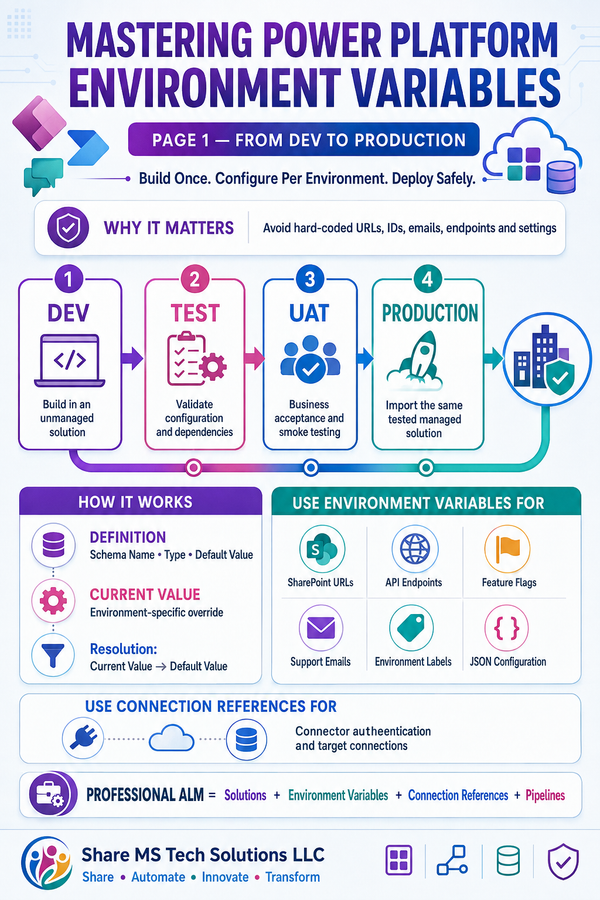
3. Connection References
Using connection references improves:
- environment migration
- governance
- deployment consistency
This becomes essential in enterprise ALM processes.
4. Error Handling & Retry Policies
Production-grade workflows must assume failure can happen.
The workflow includes:
- Configure Run After
- Scope-based error handling
- retry policies
- failure notifications
This improves reliability significantly.
5. Teams Integration
Real-time collaboration matters.
Posting updates directly into Teams channels improves:
- visibility
- transparency
- operational coordination
Metrics & Reporting
One major advantage of automation is visibility.
The workflow can track:
- number of requests
- approval turnaround time
- rejection trends
- travel costs
- departmental activity
- SLA compliance
This transforms approvals from operational tasks into actionable business intelligence.
Why Low-Code Platforms Matter
The Power Platform is not just about replacing manual work.
It enables organizations to:
- modernize operations
- improve employee experience
- reduce bottlenecks
- increase visibility
- scale processes rapidly
The real power of low-code platforms comes from combining:
- automation
- collaboration
- analytics
- governance
- modern UX
into a single operational ecosystem.
Real Business Benefits
Organizations implementing automated travel approval workflows often experience:
✅ Faster approvals
✅ Better compliance
✅ Improved employee experience
✅ Reduced manual work
✅ Centralized visibility
✅ Better audit readiness
✅ More accurate reporting
✅ Stronger operational consistency
Future Enhancements
This architecture can easily expand further with:
🔹 Power BI dashboards
🔹 AI-driven approval recommendations
🔹 adaptive cards in Teams
🔹 mobile-first approval experiences
🔹 expense reconciliation automation
🔹 integration with ERP systems
🔹 travel policy validation logic
This is where intelligent automation starts evolving into enterprise operational intelligence.
Final Thoughts
Travel request approvals may seem like a small operational process.
But at scale, inefficient workflows create:
- wasted time
- inconsistent communication
- compliance risks
- operational friction
Modern automation changes that completely.
Using Microsoft Power Automate, SharePoint, Outlook, and Teams, organizations can build intelligent workflows that are:
- faster
- smarter
- scalable
- secure
- maintainable
The future of business operations is not simply digital.
It is automated, connected, and intelligently orchestrated.
And this is exactly where the Microsoft Power Platform becomes transformational.