Building an Enterprise Purchase Approval Workflow with Microsoft Power Platform

Transform manual procurement into a secure, intelligent, and scalable enterprise process using Microsoft 365, SharePoint, Power Apps, Power Automate, Microsoft Teams, and Power BI.
Introduction
Procurement is one of the most critical business processes in any organization. Every day, employees request laptops, software licenses, office equipment, consulting services, training, travel expenses, and countless other purchases.
Unfortunately, many organizations still manage these requests through email chains, spreadsheets, paper forms, or disconnected approval processes.
While these methods may work for a small team, they become increasingly inefficient as organizations grow. Approval delays, lost documentation, budget overruns, duplicate purchases, and limited visibility quickly become everyday challenges.
The good news is that Microsoft 365 and the Power Platform provide everything needed to build a modern procurement solution—without investing in an expensive enterprise procurement platform.
This article demonstrates how to design an enterprise-grade Purchase Approval Workflow using Power Apps, Power Automate, SharePoint Online, Microsoft Teams, Power BI, Microsoft Entra ID, and Microsoft Purview. More importantly, it explores the architectural decisions that separate a simple approval flow from a scalable business solution.
Why Traditional Purchase Approval Processes Fail
Many procurement processes evolve organically over time. Employees send emails to managers, managers forward them to Finance, Procurement receives documents later, and someone manually updates a spreadsheet to track progress.
Although familiar, this approach introduces significant business risks:
- Purchase requests are scattered across email, Teams, spreadsheets, and paper forms.
- Employees lack visibility into request status.
- Approval rules vary between departments.
- Budget availability is verified manually.
- Supporting quotations and contracts become difficult to locate.
- Approvals stall when managers are unavailable.
- Duplicate purchases go unnoticed.
- Audit preparation requires extensive manual effort.
- Leadership has little insight into spending trends.
- Approved requests must often be reentered into ERP or accounting systems.
As organizations scale, these inefficiencies increase operational costs and reduce accountability.
What an Enterprise Procurement Solution Should Deliver
An enterprise purchase approval solution should do far more than route an approval email.
It should provide:
- A centralized purchase request portal
- Automated validation before approval begins
- Dynamic multi-level approval routing
- Budget and cost-center validation
- Vendor governance
- Document management
- Role-based security
- Delegation and escalation
- Executive dashboards
- Audit history
- ERP integration readiness
- Compliance with organizational policies
Ultimately, the goal is to automate routine work while strengthening governance and improving decision-making.
Solution Architecture
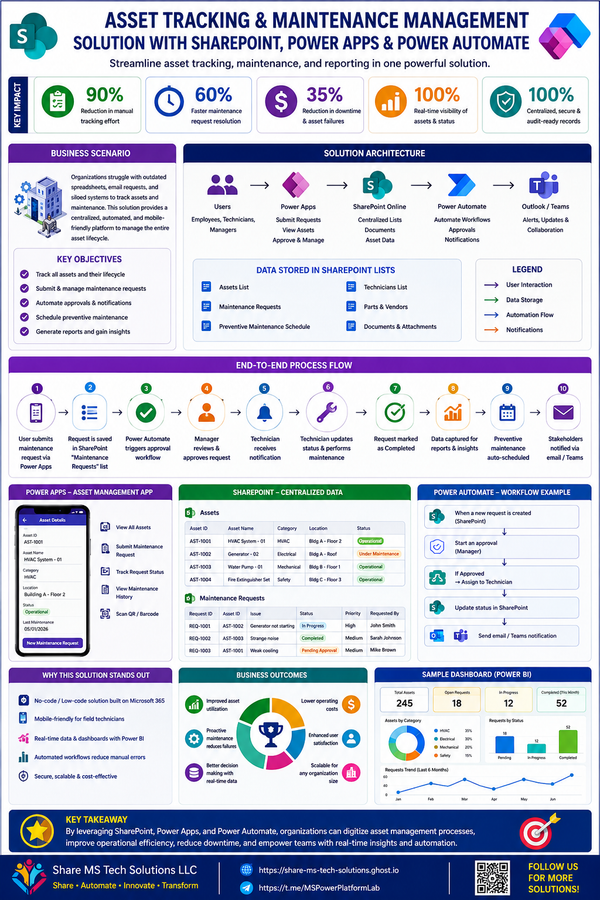
The solution is built using Microsoft's low-code platform while following enterprise design principles.
| Microsoft Technology | Purpose |
|---|---|
| Power Apps | Employee request portal |
| SharePoint Online or Dataverse | Transactional data |
| Power Automate | Workflow automation |
| Power Automate Approvals | Approval engine |
| Microsoft Teams | Notifications and collaboration |
| Outlook | Email communication |
| Microsoft Entra ID | Identity and security |
| Power BI | Analytics and executive dashboards |
| Microsoft Purview | Records management and compliance |
| AI Builder / Microsoft Copilot | Intelligent document processing and recommendations |
One of Microsoft's greatest strengths is the seamless integration between these services, allowing organizations to create solutions tailored to their business processes.
Designing the Right Data Architecture
A common mistake is placing every field into one SharePoint list.
Instead, enterprise applications separate information into logical entities.
Recommended components include:
Purchase Requests
Stores the overall request.
Typical information includes:
- Request ID
- Requester
- Department
- Cost Center
- Estimated Cost
- Business Justification
- Vendor
- Approval Status
- Purchase Order Number
Line Items
Instead of storing multiple products in a single record, each product becomes its own line item.
This approach allows:
- Unlimited products
- Better reporting
- Easier modifications
- Cleaner Power BI analytics
Approval Matrix
Rather than hard-coding approvers into Power Automate, approval rules should be maintained in a configuration table.
This allows business administrators—not developers—to update approval thresholds and approvers as organizational structures change.
Budget Configuration
Stores departmental budgets, cost centers, available balances, and funding rules.
The workflow can automatically verify whether sufficient funding exists before the approval process begins.
Vendor Directory
Maintains approved vendors, compliance status, contracts, insurance documentation, and risk classifications.
This helps ensure purchases are made only through approved suppliers.
Approval History
Every approval decision should be stored permanently.
This provides:
- Complete audit trails
- Historical reporting
- Compliance evidence
- SLA measurement
Building an Employee-Friendly Experience
Power Apps enables organizations to replace lengthy forms and email threads with an intuitive self-service portal.
Employees can:
- Create purchase requests
- Add multiple products
- Upload quotations
- Search approved vendors
- Save drafts
- Track approval status
- Respond to revision requests
- Review previous purchases
A clean interface reduces training requirements while increasing adoption.
Intelligent Approval Routing
One of the most valuable features is dynamic approval routing.
Instead of creating separate flows for every department or spending level, Power Automate can determine the correct approval path automatically.
For example:
Requests up to $1,000
Manager Approval
↓
Approved
$1,001–$5,000
Manager
↓
Department Director
↓
Approved
$5,001–$25,000
Manager
↓
Director
↓
Finance
↓
Procurement
↓
Approved
Above $25,000
Manager
↓
Director
↓
Finance
↓
Procurement
↓
Executive Leadership
↓
Approved
This architecture makes the solution scalable while reducing maintenance.
Power Automate Workflows
The automation layer orchestrates the entire procurement lifecycle.
Request Submission
The workflow:
- Validates required information
- Calculates totals
- Checks vendor status
- Verifies budget availability
- Detects duplicate requests
- Generates the Request ID
- Routes to the first approver
Manager Approval
Managers receive approval requests in Outlook or Microsoft Teams.
They can:
- Approve
- Reject
- Request revisions
- Add comments
Each decision is recorded automatically.
Finance Review
Finance verifies:
- Budget availability
- Accounting codes
- Funding sources
- Cost allocation
Only compliant requests continue.
Procurement Review
Procurement validates:
- Vendor eligibility
- Competitive bidding requirements
- Contract requirements
- Purchasing policies
Executive Approval
High-value purchases are routed automatically to executive leadership.
Because approval rules are stored in configuration tables, organizational changes require minimal development effort.
Exception Handling Matters
Real-world business processes rarely follow a perfect path.
An enterprise solution should anticipate exceptions.
Examples include:
Duplicate Requests
Potential duplicates are flagged before approval.
Insufficient Budget
Requests pause automatically until funding becomes available or Finance intervenes.
Approver on Leave
Delegation rules redirect approvals to authorized delegates.
Missing Quotations
Employees are prompted to provide required documentation before submission continues.
ERP Integration Failure
Approved requests remain in a recoverable state until synchronization succeeds.
Building for exceptions dramatically improves reliability and user confidence.
Security and Governance
Security should never be an afterthought.
Recommended roles include:
- Employee
- Manager
- Finance
- Procurement
- Executive
- System Administrator
- Auditor
Each role receives only the permissions required to perform its responsibilities.
Governance should also include:
- Version history
- Retention labels
- Sensitivity labels
- Audit logging
- Approval history
- Document metadata
- Role-based access
- Data Loss Prevention (DLP) policies
- Environment strategy for development, testing, and production
These controls help organizations remain compliant while reducing operational risk.
Power BI Executive Dashboards
Leadership requires visibility into procurement performance.
Recommended dashboards include:
Executive Overview
- Total Requested Spending
- Total Approved Spending
- Budget Utilization
- Approval Cycle Time
- Pending Requests
Procurement Analytics
- Spending by Vendor
- Spending by Category
- Contract Compliance
- Purchase Order Trends
Finance Dashboard
- Budget vs Actual
- Department Spending
- Cost Center Analysis
- Fiscal Year Trends
Operational Dashboard
- Approval Bottlenecks
- Overdue Requests
- Average Approval Duration
- Rejection Reasons
Power BI transforms procurement data into actionable insights for decision-makers.
Opportunities for AI
Microsoft Copilot and AI Builder can further enhance procurement.
Examples include:
- Summarizing business justifications
- Extracting information from quotations
- Suggesting procurement categories
- Identifying duplicate purchases
- Comparing vendor pricing
- Highlighting unusual spending patterns
- Recommending approval paths
AI should assist employees and approvers—not replace financial or procurement judgment.
Best Practices from Real-World Projects
After designing multiple Microsoft 365 business applications, several principles consistently improve long-term success:
- Keep approval logic in configuration tables rather than hard-coded flows.
- Separate transactional data from reference data.
- Build modular Power Automate flows instead of one large workflow.
- Use metadata rather than folders whenever possible.
- Design SharePoint lists with indexed columns for better performance.
- Plan governance before development begins.
- Document architecture and naming conventions.
- Test exception scenarios as thoroughly as successful ones.
- Monitor workflows and analytics continuously after deployment.
Enterprise applications succeed because they are maintainable—not because they are merely functional.
Business Impact
Organizations implementing this architecture can achieve meaningful operational improvements, including:
- Faster procurement cycles
- Improved budget control
- Greater policy compliance
- Better vendor governance
- Reduced manual effort
- Increased transparency
- Complete audit readiness
- Improved employee experience
- Better executive reporting
- Scalable procurement operations
The exact benefits depend on the organization's existing processes, governance maturity, user adoption, and system integrations.
Final Thoughts
A Purchase Approval Workflow is much more than an approval email or a Power Automate flow.
When designed thoughtfully, it becomes a strategic business platform that connects employees, managers, Finance, Procurement, executives, and reporting into a single, governed process.
Microsoft Power Platform enables organizations to modernize procurement while maintaining flexibility, reducing operational costs, and strengthening governance.
Whether your organization manages a few hundred requests each year or tens of thousands, investing in architecture, automation, security, and analytics from the beginning will create a solution that delivers value for years to come.
About Share MS Tech Solutions
Share MS Tech Solutions specializes in designing enterprise Microsoft 365, SharePoint, Power Platform, and AI-driven business solutions that help organizations automate processes, strengthen governance, and make smarter, data-driven decisions. Our focus is on building secure, scalable, and maintainable solutions that solve real business challenges—not just technical ones.
Coming Next in This Enterprise Case Study Series
Case Study #4 – Enterprise Expense Claims Management System
We'll explore how to build a complete expense reimbursement solution featuring:
- Mobile receipt capture with AI
- OCR using AI Builder
- Policy and mileage validation
- Per diem calculations
- Multi-currency support
- Multi-stage approvals
- Integration with ERP and finance systems
- Fraud detection and duplicate claim prevention
- Power BI executive dashboards
- Microsoft Teams integration
- Enterprise governance and auditability
Stay tuned as we continue building a portfolio of real-world Microsoft Power Platform solutions that reflect enterprise architecture and implementation best practices.