Employee Training Tracker Solution Using SharePoint, Power Apps, Power Automate, and Power BI
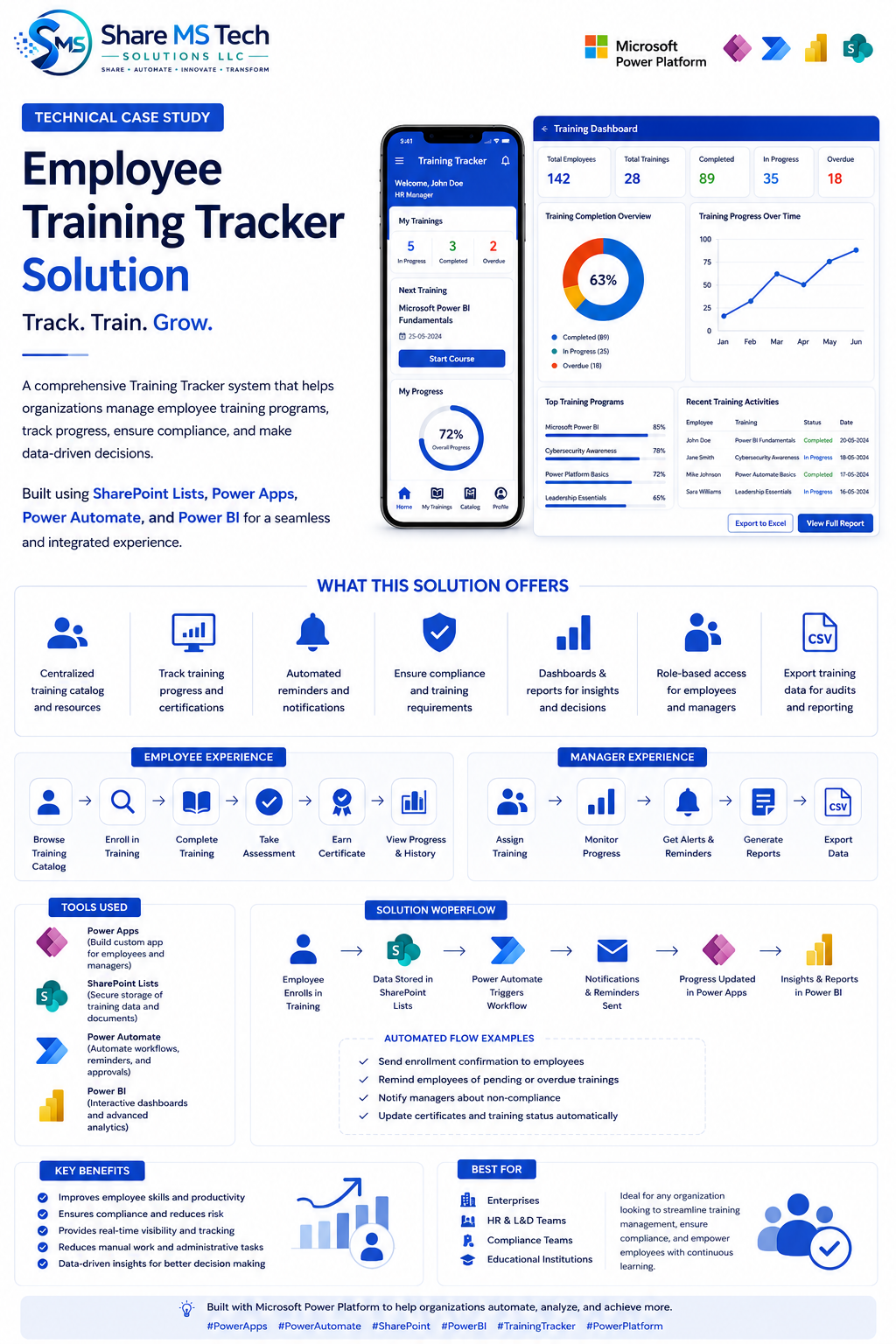
Transform Employee Learning and Compliance with Microsoft Power Platform
Employee training is no longer just an HR function. In today's digital workplace, organizations must continuously upskill employees, track certifications, ensure compliance, and provide visibility into learning progress across departments.
Unfortunately, many organizations still rely on spreadsheets, emails, and disconnected systems to manage training programs. This often leads to:
- Missed certifications
- Incomplete compliance records
- Manual follow-ups
- Limited reporting capabilities
- Poor employee engagement
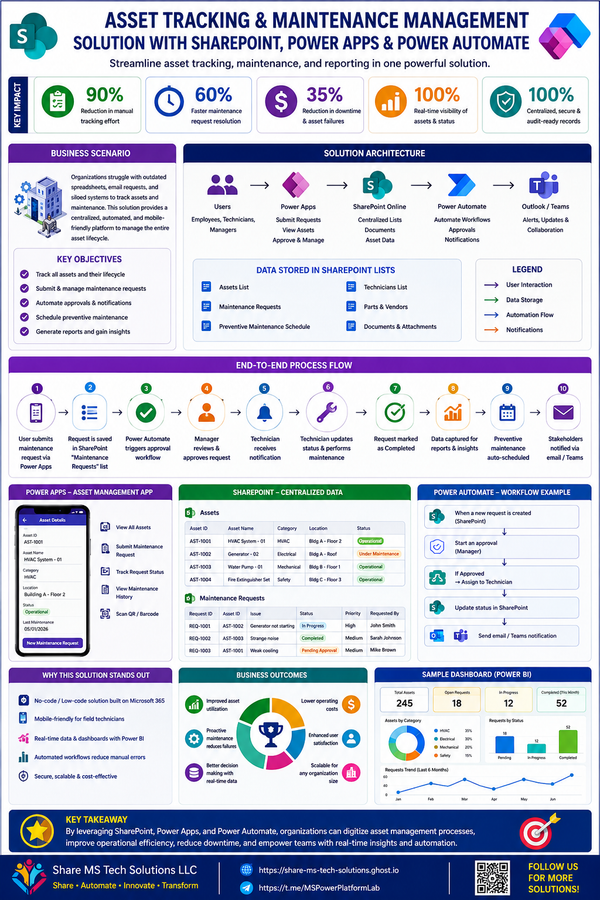
To address these challenges, we designed a modern Employee Training Tracker Solution using Microsoft SharePoint, Power Apps, Power Automate, and Power BI.
The result is a centralized, scalable, and automated platform that simplifies training management while providing real-time insights for both employees and managers.
Business Challenges
Many organizations face common training management problems:
Manual Tracking
Training records are often stored in spreadsheets, making updates time-consuming and error-prone.
Lack of Visibility
Managers struggle to identify who has completed required training and who remains non-compliant.
Missed Deadlines
Employees frequently miss training deadlines because reminder processes are manual or inconsistent.
Reporting Difficulties
Generating compliance reports for audits can take days or even weeks.
Data Silos
Training information is scattered across emails, spreadsheets, learning portals, and shared folders.
Solution Overview
The Employee Training Tracker Solution centralizes all training-related information into a single platform built on Microsoft Power Platform.
Core Components
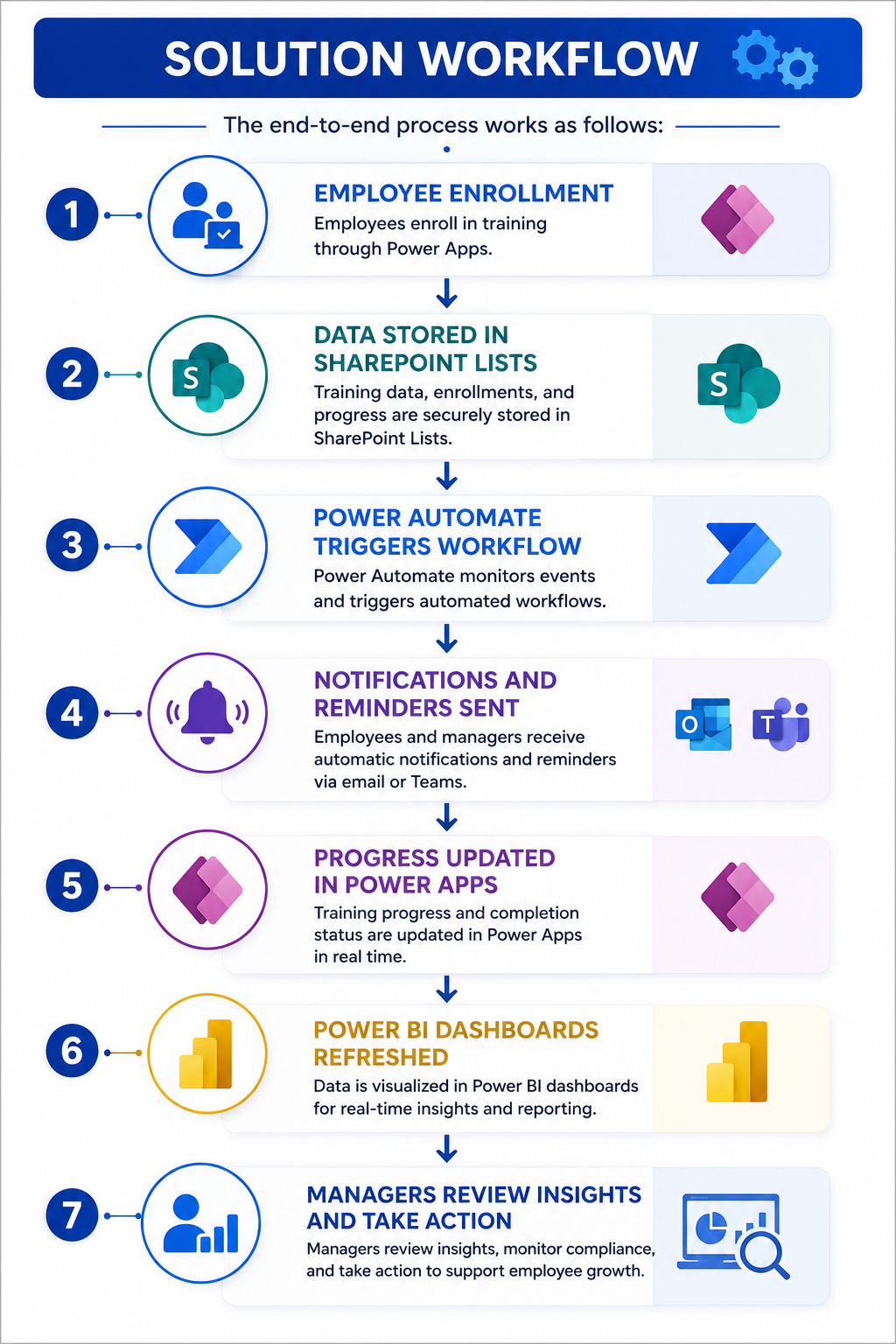
SharePoint Online
Acts as the secure data repository.
Stores:
- Employee profiles
- Training catalogs
- Certification records
- Completion history
- Compliance requirements
Power Apps
Provides a user-friendly interface for employees and managers.
Employees can:
- Browse available training
- Register for courses
- Complete assessments
- Track certifications
- View learning history
Managers can:
- Assign training
- Monitor progress
- Review compliance status
- Generate reports
Power Automate
Automates critical business processes such as:
- Enrollment confirmations
- Training reminders
- Expiration alerts
- Escalation notifications
- Compliance workflows
- Certification updates
Power BI
Delivers executive-level reporting and analytics.
Leadership can monitor:
- Completion rates
- Department compliance
- Certification status
- Training effectiveness
- Learning trends
Key Features
Centralized Training Catalog
Employees can access all learning resources from a single location.
This includes:
- Internal training
- Compliance courses
- Technical certifications
- Leadership development programs
- External learning resources
Progress Tracking
Employees can easily view:
- Completed courses
- Courses in progress
- Pending assignments
- Certification status
- Learning history
Managers gain visibility into team-wide progress.
Automated Notifications
Power Automate ensures no training requirement is overlooked.
Examples include:
- New assignment notifications
- Upcoming due date reminders
- Overdue training alerts
- Certification expiration warnings
- Manager escalation emails
Compliance Monitoring
Organizations in healthcare, government, finance, and regulated industries can monitor mandatory training requirements in real time.
Compliance dashboards instantly identify:
- Completed requirements
- Expiring certifications
- Non-compliant employees
- High-risk departments
Executive Dashboards
Power BI dashboards provide actionable insights such as:
Training Completion Rate
Monitor overall organizational progress.
Department Performance
Compare learning performance across teams.
Certification Health
Track certification validity and renewal status.
Trend Analysis
Understand learning patterns over time.
Employee Experience
The solution delivers a simple and intuitive employee journey:
Step 1: Browse Training Catalog
Employees view available courses and learning paths.
Step 2: Enroll
Register for assigned or optional training.
Step 3: Complete Training
Finish courses and assessments.
Step 4: Earn Certification
Receive training completion confirmation.
Step 5: Track Progress
Monitor achievements through personal dashboards.
Manager Experience
Managers receive a powerful oversight dashboard.
Assign Training
Assign courses to individuals, departments, or teams.
Monitor Progress
View completion rates and compliance metrics.
Receive Alerts
Get automatic notifications for overdue training.
Generate Reports
Export audit-ready compliance reports.
Improve Workforce Readiness
Identify skill gaps and training opportunities.
Business Benefits
Organizations implementing this solution can expect:
Reduced Administrative Effort
Automated workflows eliminate repetitive manual tasks.
Improved Compliance
Real-time monitoring reduces audit risk.
Better Employee Engagement
Employees gain visibility into their learning journey.
Faster Reporting
Generate executive and audit reports instantly.
Data-Driven Decisions
Leadership can identify trends and make informed workforce development decisions.
Increased Productivity
Managers spend less time tracking spreadsheets and more time developing talent.
Ideal Use Cases
This solution is ideal for:
- Corporate Learning & Development Teams
- Human Resources Departments
- Compliance Teams
- Healthcare Organizations
- Government Agencies
- Educational Institutions
- Manufacturing Companies
- Financial Services Organizations
Future Enhancements
Organizations can further expand the solution by integrating:
- Microsoft Teams Learning Notifications
- AI-Powered Learning Recommendations
- Microsoft Copilot for Training Insights
- QR Code Training Attendance Tracking
- Digital Badge Management
- Employee Skills Matrix
- Career Development Pathways
- Learning Management System (LMS) Integrations
Final Thoughts
A modern workforce requires a modern training management platform.
By combining SharePoint, Power Apps, Power Automate, and Power BI, organizations can build a scalable employee training tracker that improves compliance, increases visibility, reduces administrative effort, and empowers employees to continuously grow their skills.
Rather than managing training through disconnected spreadsheets and manual processes, organizations can leverage Microsoft Power Platform to create a centralized, automated, and intelligent learning ecosystem that supports both employee development and business success.
Built with Microsoft Power Platform by Share MS Tech Solutions LLC
Share • Automate • Innovate • Transform