Power BI June 2026 Update: One of the Biggest Releases in Years
AI-Powered Development, Smarter Reporting, and Enterprise Innovation
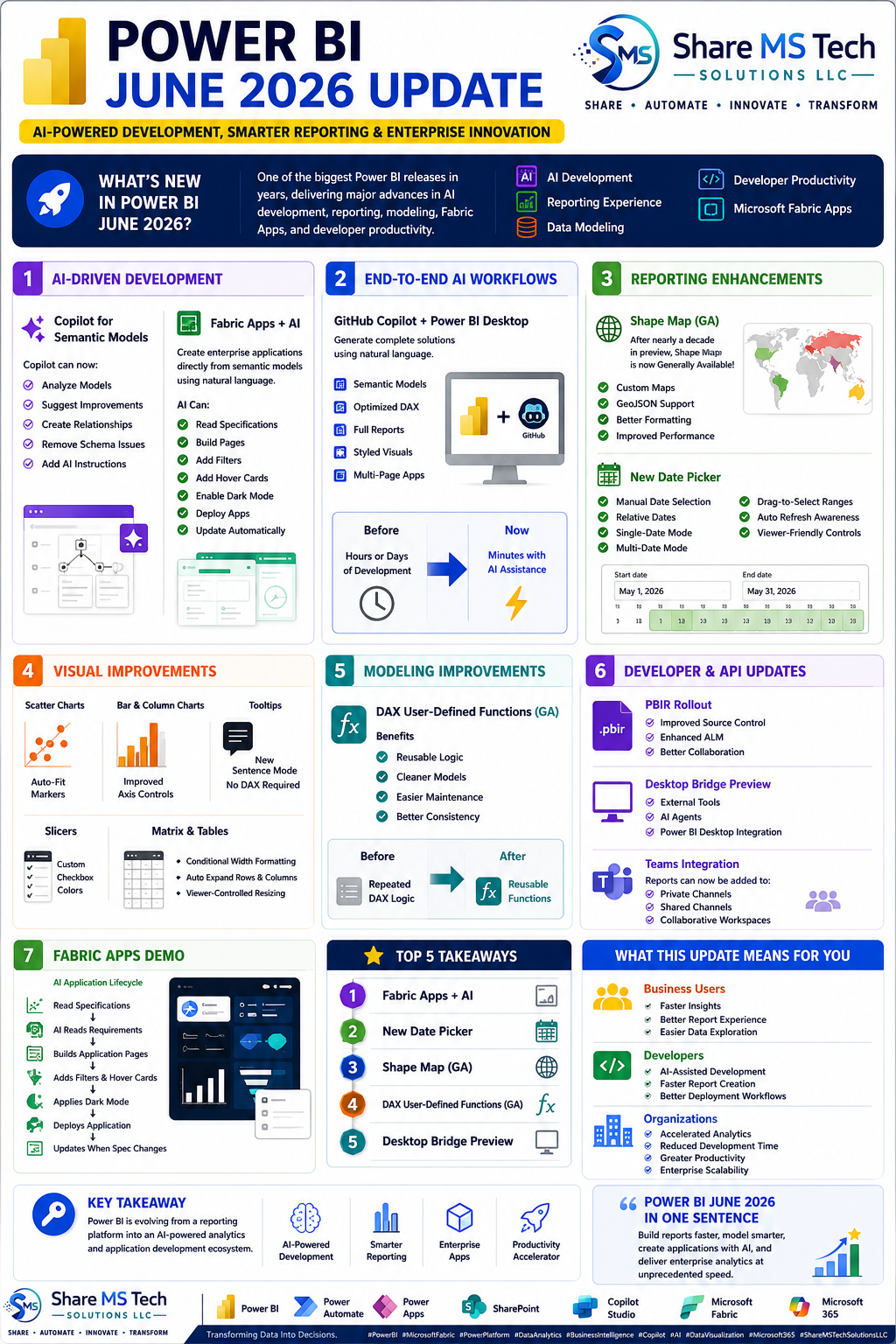
Microsoft continues to accelerate the evolution of Power BI, and the June 2026 update may be one of the most significant releases we've seen in years. This update goes far beyond incremental improvements—it introduces major advancements in AI-assisted development, reporting experiences, semantic modeling, developer productivity, and Microsoft Fabric integration.
For business users, developers, and enterprise organizations, these updates represent a major step toward faster analytics, smarter automation, and AI-powered application development.
Let's explore the key highlights and what they mean for your organization.
The Rise of AI-Powered Development
Artificial intelligence is no longer a separate feature within Power BI—it is becoming a core part of the development experience.
Copilot for Semantic Models
One of the most impactful enhancements is the continued expansion of Copilot capabilities for semantic modeling.
Copilot can now:
- Analyze existing semantic models
- Suggest optimization opportunities
- Create relationships automatically
- Identify schema issues
- Add AI-readiness instructions
- Improve overall model quality
These capabilities help reduce manual modeling effort while improving consistency and governance across enterprise solutions.
Fabric Apps + AI
Perhaps the most exciting announcement is the introduction of AI-powered Fabric Apps.
Organizations can now create custom business applications directly from semantic models using natural language instructions.
Imagine describing your requirements and having AI:
- Create pages
- Add filters
- Configure navigation
- Build hover cards
- Enable dark mode
- Deploy applications automatically
This dramatically reduces development time and opens the door for faster business solution delivery.
End-to-End AI Workflows
Microsoft is positioning Power BI and Fabric as a complete AI-assisted development ecosystem.
GitHub Copilot + Power BI Desktop
Developers can now leverage GitHub Copilot alongside Power BI Desktop to accelerate solution development.
AI can assist with:
- Building semantic models
- Creating optimized DAX
- Generating report pages
- Applying visual styling
- Building multi-page applications
Tasks that previously required hours or even days can now be completed in minutes with AI assistance.
This shift allows developers to focus more on business value and less on repetitive technical tasks.
Major Reporting Enhancements
The June 2026 release introduces some of the most requested reporting improvements in recent memory.
Shape Map is Finally Generally Available
After spending nearly a decade in preview, Shape Map has officially reached General Availability.
Key benefits include:
- Custom map support
- GeoJSON integration
- Better formatting controls
- Improved performance
- Enhanced geographic visualization capabilities
Organizations working with geographic data can now confidently adopt Shape Maps in production environments.
The New Date Picker
The redesigned Date Picker may become one of the most widely used features introduced this year.
New capabilities include:
- Manual date selection
- Relative date selection
- Single-date mode
- Multi-date mode
- Drag-to-select date ranges
- Automatic refresh awareness
- Enhanced viewer experience
This improvement significantly enhances report usability while simplifying date-based filtering for business users.
Visual Improvements Across Power BI
Microsoft also introduced numerous enhancements to existing visualizations.
Scatter Charts
Scatter charts now support automatic marker fitting, improving readability and reducing manual formatting.
Bar and Column Charts
Improved axis controls provide greater flexibility for report designers.
Tooltips
The new Sentence Mode allows report creators to build meaningful narrative-style tooltips without writing DAX.
Slicers
Users can now customize checkbox colors, improving visual consistency and accessibility.
Matrix and Tables
Enhancements include:
- Conditional column width formatting
- Auto-expand functionality
- Viewer-controlled resizing
These updates improve report usability and overall user experience.
Modeling Improvements: DAX User-Defined Functions
One of the most important updates for developers is the General Availability of DAX User-Defined Functions.
This feature enables reusable business logic within Power BI models.
Benefits include:
- Reduced code duplication
- Improved maintainability
- Cleaner semantic models
- Greater consistency across reports
For organizations managing large-scale enterprise models, this capability can significantly improve long-term governance and maintainability.
Developer and API Enhancements
The June 2026 release also introduces improvements designed specifically for developers.
PBIR Rollout Continues
Power BI Report (PBIR) enhancements continue to improve source control, collaboration, and application lifecycle management practices.
Desktop Bridge Preview
Desktop Bridge allows external tools and AI agents to connect directly with Power BI Desktop.
This opens exciting opportunities for:
- Automation
- External integrations
- AI-assisted development workflows
- Enhanced productivity
Microsoft Teams Integration
Power BI reports can now be added directly to:
- Teams Private Channels
- Teams Shared Channels
- Collaborative Workspaces
This strengthens the connection between analytics and collaboration.
Fabric Apps: A Glimpse into the Future
The Fabric Apps demonstration showcased Microsoft's vision for AI-assisted application development.
The workflow is remarkably simple:
- Define requirements using natural language.
- AI reads the specification.
- Application pages are generated automatically.
- Filters and interactions are configured.
- Dark mode and styling are applied.
- The application is deployed.
- Updates occur automatically when requirements change.
This capability represents a major shift in how organizations may build data-driven applications moving forward.
What This Means for Organizations
The June 2026 Power BI release delivers value across multiple audiences.
For Business Users
- Faster access to insights
- Improved report usability
- Better self-service analytics
For Developers
- AI-assisted development
- Faster report creation
- Reusable DAX functions
- Improved deployment workflows
For Organizations
- Reduced development effort
- Accelerated analytics delivery
- Increased productivity
- Stronger enterprise scalability
Top Five Takeaways
If you only remember five things from this update, make them these:
- Fabric Apps + AI
- New Date Picker
- Shape Map General Availability
- DAX User-Defined Functions
- Desktop Bridge Preview
These features have the potential to significantly impact how organizations build, deploy, and manage analytics solutions.
Final Thoughts
Power BI is evolving beyond traditional reporting.
It is becoming an AI-powered analytics platform, an application development platform, and a productivity accelerator all at once.
The June 2026 update demonstrates Microsoft's commitment to making data analytics more intelligent, more accessible, and more integrated with AI-driven workflows.
For organizations investing in Power BI, Microsoft Fabric, and the broader Power Platform ecosystem, this release represents a significant step toward the future of enterprise analytics.
The question is no longer whether AI will influence analytics—it is how quickly organizations will adapt to take advantage of it.
About Share MS Tech Solutions LLC
Share MS Tech Solutions LLC helps organizations maximize the value of Microsoft technologies through SharePoint, Power Platform, Power BI, Microsoft Fabric, Copilot, automation, and digital transformation solutions.
Share • Automate • Innovate • Transform